Class Resource Details
Use the information in the table below to help you create or edit a class resource.
To manage class resources, you user role must have unrestricted access to the Class Resource Manager feature in the System Roles (Manage Features > Catalog Manager Features.)
To manage class resources, go to Manage Center > Learning > Class Resources.
Table: Class Resource Details
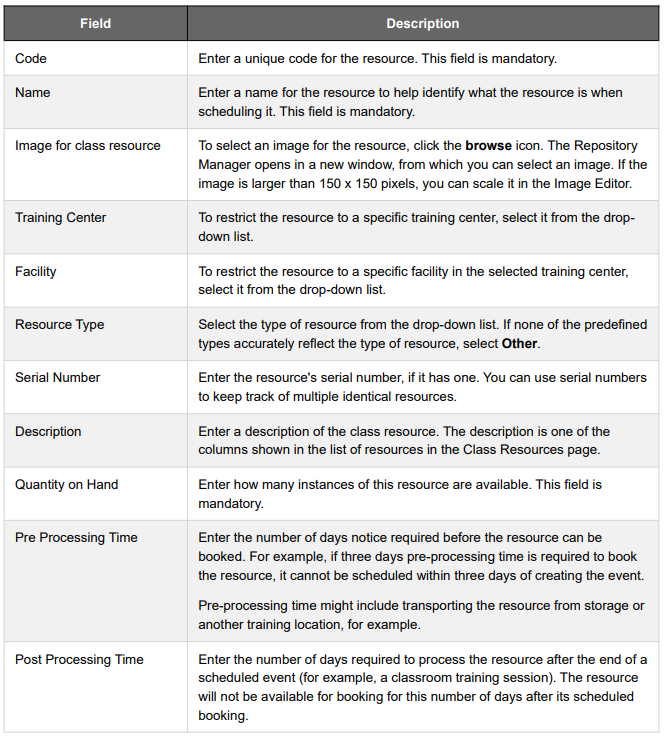
To manage class resources, you user role must have unrestricted access to the Class Resource Manager feature in the System Roles (Manage Features > Catalog Manager Features.)
To manage class resources, go to Manage Center > Learning > Class Resources.
Table: Class Resource Details
Related Articles
Edit a Class Resource Attribute
Applicable Release: All Versions Summary: Catalog administrators can edit or delete class resource attributes. There are restrictions on the attribute type you can select if you need to change it. For more information, see Class Resource Attribute ...Create a Class Resource Attribute
Applicable Release: All Versions Summary: Catalog administrators can create a class resource attribute and specify the areas of the LMS where the attribute information is shown to administrators and learners. To create a class resource attribute: 1. ...About Class Resource Attributes
Applicable Release: All Versions Summary: As a catalog administrator you can create class resource attributes to capture the general properties applicable to class resources. For example, projectors may have different input options, such as VGA, ...Book a Class Resource
Catalog administrators can book a class resource from the Class Resource Calendar to reserve it for a future event. This could be for a classroom-based course that has yet to be configured in the LMS, for example. When you book a resource a scheduled ...Class Resource Attribute Reference
Applicable Release: All Versions Summary: Use the information in the table below to help you create or edit class resource attributes. To manage class resource attributes, your user role must have unrestricted access to the Class Resource Manager ...